How Fast Do Most People Actually Type?
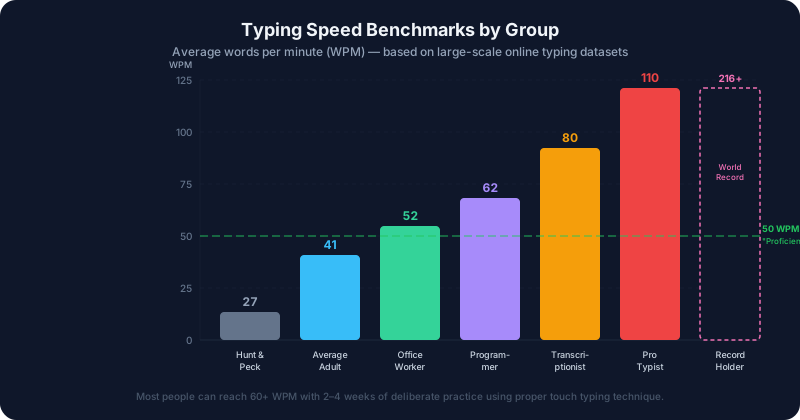
Before chasing a faster speed, it helps to know where you stand. Across large-scale online typing datasets, the average adult types around 40–52 WPM (words per minute). But that single number hides a lot of variation.
Here’s what recent data shows by profession:
| Group | Average WPM |
|---|---|
| Students | ~33 WPM |
| Office workers | ~37 WPM |
| Teachers | ~41 WPM |
| Programmers | ~54 WPM |
| Legal professionals | ~61 WPM |
| Data entry operators | ~52 WPM |
Age matters too. Adults aged 18–30 average 60–80 WPM, while people 65 and older typically type around 25–30 WPM. Interestingly, older typists tend to make fewer errors — accuracy increases even as raw speed decreases.
The takeaway: if you’re typing 40 WPM, you’re squarely average. If you’re above 60 WPM, you’re in the top 25% of all typists.
Why Accuracy Matters More Than Speed
Here’s a counterintuitive fact: 40 WPM with 98% accuracy is more productive than 60 WPM with 85% accuracy.
When you type 60 WPM but make frequent mistakes, you spend significant time backspacing, retyping, and proofreading. The corrections eat all the theoretical advantage. Most typing experts recommend a rule: don’t increase your target speed until you hold 95% accuracy or higher at your current level.
For professional work, aim for 97–99% accuracy. Speed will come naturally as your muscle memory solidifies.
The Science Behind Learning to Type Faster
Typing is fundamentally a motor skill, and motor skills follow a predictable learning curve. Like reaction time, it depends on how quickly your brain processes information and sends commands to your muscles.
- Cognitive stage: You consciously think about each key. Slow, deliberate, error-prone.
- Associative stage: Patterns start to form. You stop hunting for keys as much.
- Autonomous stage: Your fingers move without conscious thought — pure muscle memory.
Most people are stuck in stage 1 or 2 because they never practiced correctly. The good news: deliberate practice with proper technique can accelerate progress dramatically.
The Most Important Rule: Stop Looking at Your Keyboard
This is the single biggest habit separating fast typists from slow ones. Touch typists — people who never look at the keyboard — consistently outperform “hunt and peck” typists, even when the hunt-and-pecker has been typing for years.
Your brain forms muscle memory through repetition. Every time you look down at the keys, you interrupt that process and reinforce visual dependency instead.
Setting Up for Success: Posture and Hand Position
Good technique prevents both slowdowns and injury. Before worrying about speed:
Posture:
- Sit with your back straight and feet flat on the floor
- Keep your elbows at roughly 90 degrees
- Position your screen at eye level to avoid neck strain
Hand placement:
- Left hand: fingers rest on A, S, D, F — left thumb on spacebar
- Right hand: fingers rest on J, K, L, ; — right thumb on spacebar
- The F and J keys have small ridges so you can find home position without looking
Wrist position:
- Keep wrists slightly elevated, not resting on the desk while actively typing
- Resting on a wrist pad while typing actually increases strain — use it during pauses
Realistic Improvement Timeline
Many beginners expect dramatic improvement after a few sessions. Real progress looks more like this:
Weeks 1–2: The hardest phase. You’ll feel slower than before because you’re unlearning bad habits. Expect 15–25 WPM with many errors. This is normal.
Weeks 3–8: Muscle memory begins forming. Speed climbs to 30–45 WPM with improving accuracy. The biggest visible progress window.
Months 3–6: Hitting 50–70 WPM becomes realistic with consistent daily practice (15–30 minutes per day is enough).
6+ months: The 70–100 WPM range requires targeted practice — drills on specific problem keys, punctuation, and common word patterns.
Speed plateaus are normal. When you plateau at a particular speed, it means you’ve achieved that level through habit but haven’t yet internalized the next level. Targeted drills on weak spots typically break through.
Practice Methods That Actually Work
Structured Lessons (Best for Beginners)
Free platforms like TypingClub, Keybr, or Typing.com walk you through the keyboard systematically — learning F and J first, then expanding outward. This structured approach builds complete keyboard coverage instead of leaving blind spots.
Spend 15–20 minutes per day, every day. Consistent short sessions beat occasional long ones.
Focused Drilling on Weak Keys
After completing a basic course, identify your slowest keys or letter combinations. Deliberately practice sentences that use those letters heavily. For most people, the number row, punctuation, and less common letters like Q, Z, X are the weak points.
Typing Real Text (Not Just Tests)
Random word tests build speed, but typing actual meaningful content — emails, articles, your own writing — builds the patterns you’ll use every day. Transcribing articles you find interesting is a particularly effective technique.
Competition and Gamification
Sites like TypeRacer, Monkeytype, and NitroType add competitive stakes that many people find motivating. Typing with other people (or racing against your own records) pushes you to sustain concentration longer than solo drills.
Common Mistakes That Limit Progress
Practicing sloppy habits under time pressure. If you rush to hit a high WPM number and ignore accuracy, you’re just reinforcing mistakes. Always favor accuracy over speed.
Skipping difficult letters. It’s tempting to practice words you already type well. Target your worst letters deliberately, even though it’s frustrating.
Inconsistent hand position. Drifting away from home position during typing — particularly stretching one hand to hit keys that belong to the other — creates inefficiency and risks injury over time.
Taking too many breaks in sessions. Short, focused practice works better than extended sessions with frequent interruptions. Twenty focused minutes beats ninety distracted minutes.
Goals Worth Aiming For
Depending on your situation, here are meaningful targets:
- 40 WPM: Average adult. Fine for casual use.
- 60 WPM: Comfortable for most office work. Top 25% of all typists.
- 80 WPM: Efficient for writing-heavy roles (journalism, content creation, legal work).
- 100+ WPM: Professional typist territory. Achievable with serious practice, but not necessary for most people.
The world record — 216 WPM set by Stella Pajunas in 1946 on an IBM electric typewriter — is a curiosity. Competitive typists today regularly achieve 150–180 WPM on modern platforms. You don’t need to be anywhere near that to dramatically improve your productivity.
The Productive Truth
Improving from 40 to 60 WPM might sound modest, but consider the compounding effect: if you write or type for two hours per day, that improvement translates to roughly 40 extra minutes of output in the same time window. Over a year, that adds up significantly.
The best time to develop this skill is now, while the habit is easy to build. Start with your baseline — take a typing test to see exactly where you stand — then set a realistic 90-day goal. Fifteen minutes of deliberate daily practice is enough.